The basic flow is straightforward. Press a button, speak a command like 'forward' or 'left', and the robot moves. Behind the scenes, the STM32F3 Discovery captures audio from an INMP441 microphone using I2S, streams the raw audio over UART to an ESP-01S WiFi module, which sends it to a Python server running on my laptop. The server wraps the audio in a WAV file, sends it to OpenAI's Whisper API, parses the transcription for keywords, and sends back a simple command byte. The STM32 receives this and controls the rear drive motors through an L293D driver, while an SG90 servo steers the front wheels.
Voice-Controlled Robot Car
STM32speech-recognitionroboticsmotor-controlembeddeduniversity-project3d-printing
🖼️1 / 2
Project Overview
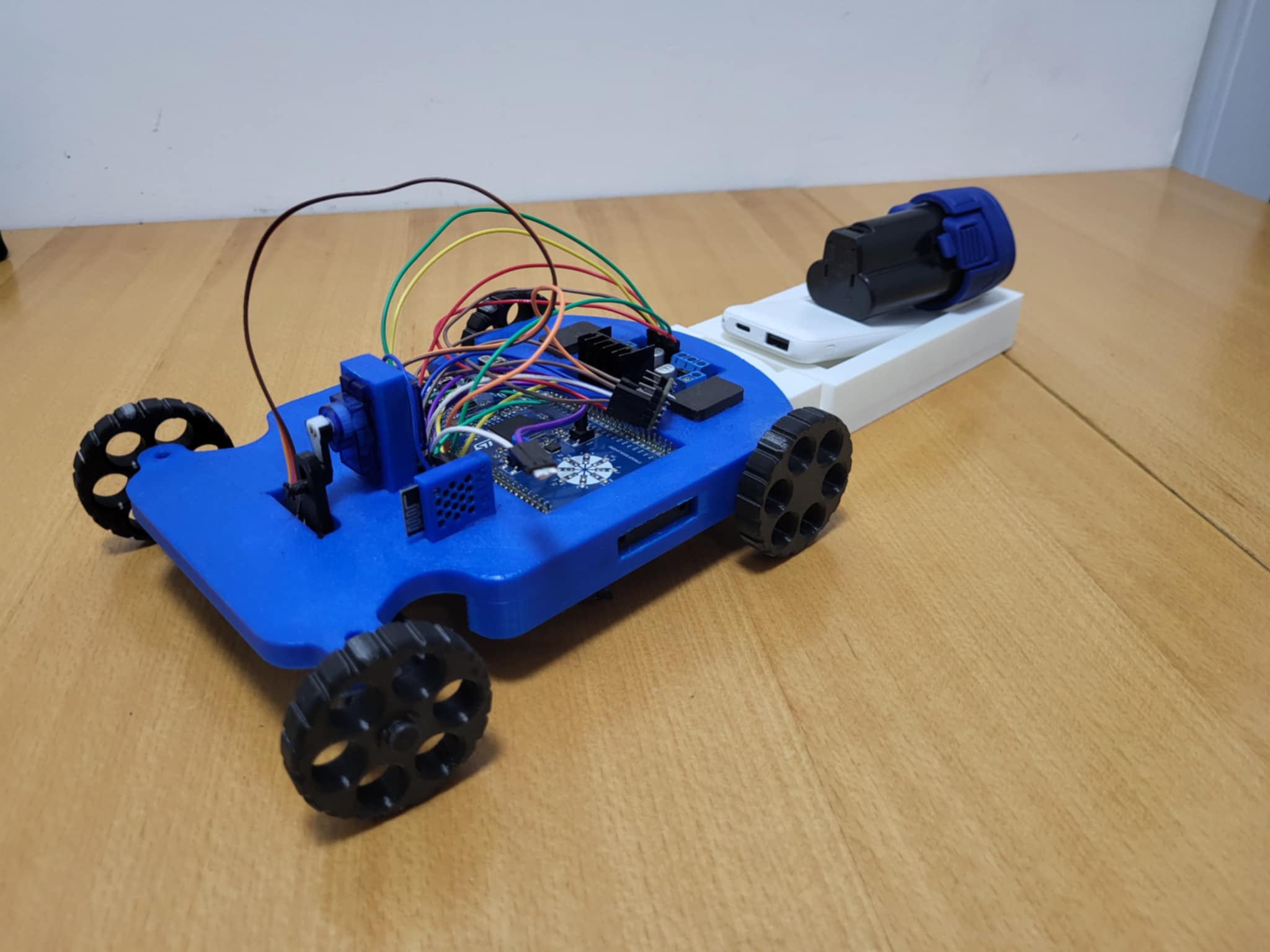
This project started as a final assignment for my embedded systems course at university. The goal was simple: build something that connects multiple components together and does something useful. I decided to make a small robot car that responds to voice commands. It turned out to be a great way to learn how microcontrollers, WiFi modules, audio hardware, and motor drivers can all work together. I also designed and 3D printed my own chassis and steering mechanism. The system captures voice through an I2S microphone, sends it through an ESP-01S to a Python server, which forwards it to OpenAI's Whisper API for transcription. The recognized command comes back and the STM32 controls the rear motors for drive and a front servo for steering.
Version:v1.0
Time:~1.3 hours
Cost:~45
Status:complete
Materials
- STM32F3 Discovery board × 1
- ESP-01S WiFi module × 1
- INMP441 I2S MEMS microphone × 1
- L293D motor driver (DIP-16) × 1
- SG90 servo motor × 1
- Mini360 buck converter module × 1
- DC gear motors (3-6V) × 2
- Robot wheels × 4
- 5V USB powerbank × 1
- Push button × 1
- Breadboard × 1
- Jumper wires × 1
- 3D printed chassis parts (custom STLs) × 1
Tools
- Soldering iron
- Multimeter
- Wire strippers
- Screwdriver set
- 3D printer
- Logic analyzer (optional, helpful for debugging)
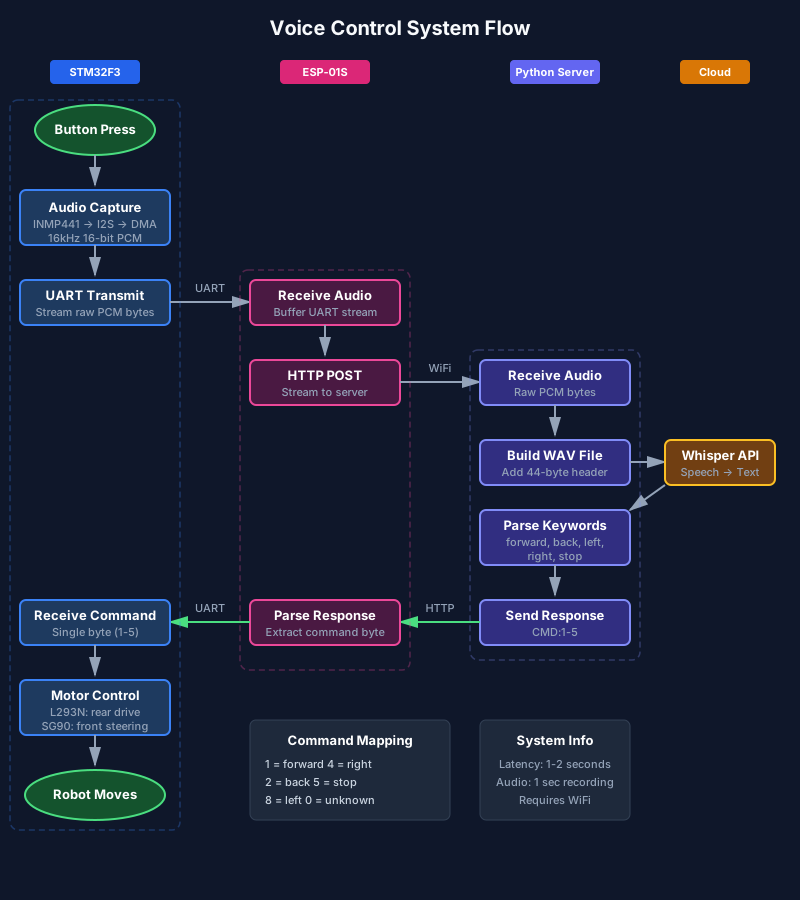
The project breaks down into a few connected pieces: audio capture, wireless communication, cloud processing, and motor control. Each part taught me something different about embedded systems.
2.1
Audio Capture
The INMP441 is a digital MEMS microphone that outputs audio over I2S. This was my first time working with I2S, and it took some time to get the STM32's I2S peripheral configured correctly. The mic captures 16-bit audio at 16 kHz, which is more than enough for voice. One second of audio is about 32KB, small enough to stream over UART without too much trouble.
2.2
WiFi Communication
The ESP-01S is a tiny WiFi module with limited resources. It doesn't have enough RAM to buffer the entire audio clip, so I set it up to stream data directly from UART to an HTTP POST request. This was a bit tricky to get working reliably, but once the timing was right, it worked well. The ESP connects to my local network and sends audio to a Python server running on my laptop.
2.3
Server and Speech Recognition
The Python server is simple. It receives raw audio bytes, adds a WAV header, and forwards it to OpenAI's Whisper API. Whisper handles the actual speech recognition and returns a text transcription. The server checks for keywords like 'forward', 'back', 'left', 'right', and 'stop', then sends a single command byte back to the ESP, which forwards it to the STM32.
2.4
Motor and Steering Control
The car uses a standard automotive-style layout: two DC motors in the rear for drive, and a servo in the front for steering. The L293D motor driver handles the rear motors, which always spin together in the same direction. The SG90 servo sits in the center of the front axle and turns both front wheels together through a simple linkage mechanism. Forward and backward commands control the rear motors, while left and right commands move the servo to steer.



The robot uses a four-wheel car layout with rear-wheel drive and front-wheel steering. I designed the chassis and steering mechanism myself and 3D printed all the structural parts.
3.1
Chassis Design
I designed the chassis from scratch in Fusion 360 and printed it on my 3D printer. The base plate holds the rear motors and front steering assembly, while a top plate provides mounting for the electronics. I went through a few iterations to get the motor mounts aligned properly and to make sure there was enough clearance for the steering mechanism to move freely. The STL files are shown in the carousel below.
3.2
Steering Mechanism
The front steering uses an SG90 servo mounted in the center of the chassis. The servo horn connects to a simple linkage that ties both front wheels together, so when the servo rotates, both wheels turn in the same direction. This mimics how real car steering works, with Ackermann-style geometry (though my version is a simplified approximation). The servo bracket and steering links were all custom designed and 3D printed.
3.3
Drive System
Two DC gear motors mounted at the rear provide the drive. They're wired in parallel through the L293D, so they always spin at the same speed and direction. The motors are rated for 3-6V, and running them from a 5V powerbank gives decent speed without overdriving them. The rear wheels attach directly to the motor shafts.
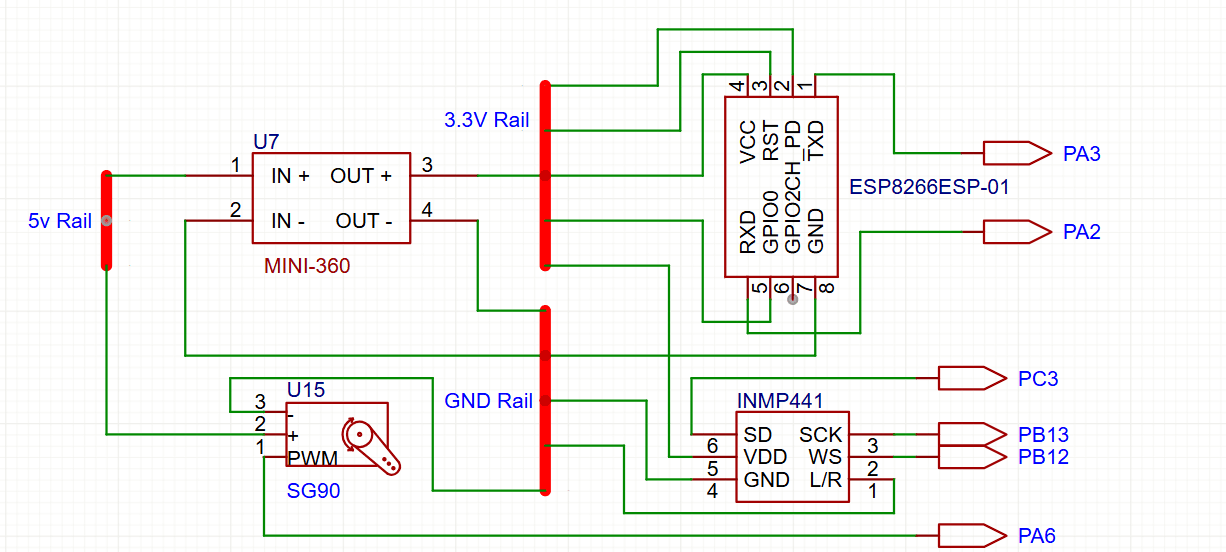
The electronics connect several modules to the STM32F3 Discovery board. I created two diagrams to show the wiring: one for the motor driver, servo, and motors, and another for the power and communication components.
4.1
Power Distribution
Everything runs from a 5V USB powerbank. The STM32 Discovery takes 5V directly. The L293D motor driver runs on 5V for both logic and motor power. The SG90 servo also runs directly from 5V. A Mini360 buck converter steps the 5V down to 3.3V for the ESP-01S and INMP441 microphone. Using a switching converter instead of a linear regulator means less heat, which matters in a small enclosed space.
4.2
Motor Driver and Servo
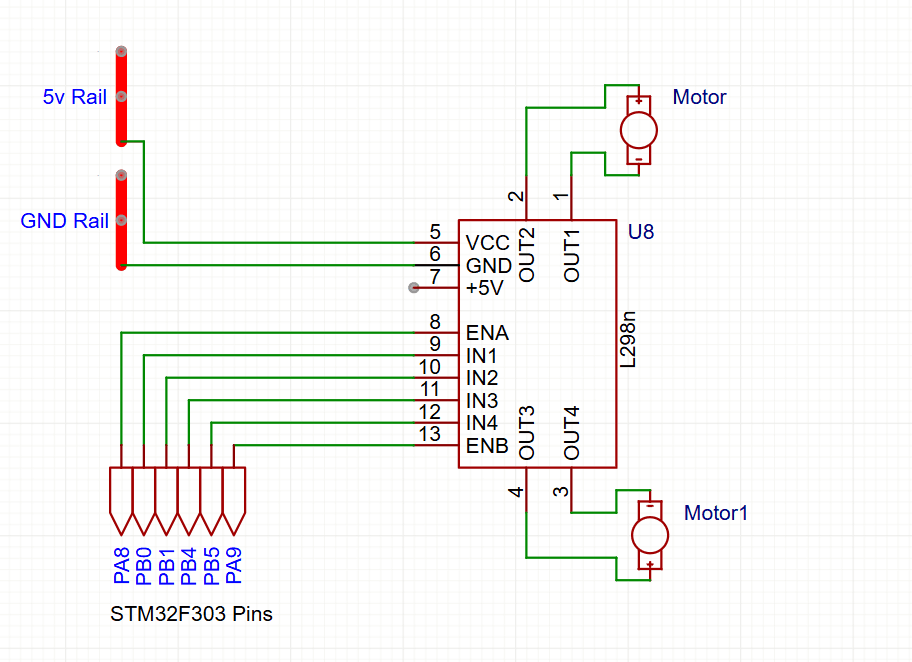
The L293D connects to the STM32 for the rear drive motors. Since both motors always spin together, I only use one channel of the L293D (EN1 for PWM speed, IN1/IN2 for direction). The other channel is available if I ever want independent control. The SG90 servo connects directly to a PWM pin on the STM32 for position control. A diagram shows the full motor driver and servo wiring.
4.3
Communication Wiring
The ESP-01S connects to the STM32 over UART. TX from the ESP goes to RX on the STM32 and vice versa. The INMP441 microphone uses I2S, which needs three signal lines: serial data, word select, and clock. The L/R pin on the mic is tied to ground to select the left channel. A second diagram shows all these connections along with the Mini360 power module.
Since the STM32F3 Discovery board is large and would make a full schematic cluttered, I split the wiring into two focused diagrams. The first shows the L293D motor driver with the rear motors and the SG90 servo, along with their STM32 pin assignments. The second shows the Mini360 buck converter, ESP-01S, and INMP441 microphone with their interconnections. Both diagrams show the STM32 connections as labeled pins rather than drawing the entire board.
The firmware runs on the STM32, and a separate Python script runs the server. Both are fairly straightforward.
6.1
STM32 Firmware
The firmware initializes the I2S peripheral for audio capture, UART for communication with the ESP, timers for motor PWM and servo control, and GPIO for direction pins. When the user presses a button, it starts recording audio via DMA, then streams the data over UART to the ESP. After sending, it waits for a response byte. For forward/backward commands, it sets the motor direction and speed. For left/right commands, it adjusts the servo angle. I used STM32CubeIDE and the HAL libraries, which made peripheral setup much easier than bare-metal register programming.
6.2
ESP-01S Firmware
The ESP runs Arduino-based firmware. It listens for a start byte on UART, reads the audio length, then streams incoming bytes directly to an HTTP POST request to the Python server. When it gets a response, it extracts the command byte and sends it back over UART. The key challenge was avoiding large buffers since the ESP-01S has limited RAM.
6.3
Python Server
The server uses Flask to handle HTTP requests. When it receives audio, it constructs a WAV header, wraps the raw PCM data, and sends it to the Whisper API. The response text is checked for command keywords, and a simple byte is returned: 1 for forward, 2 for back, 3 for left, 4 for right, 5 for stop, 0 for unrecognized.
This project taught me a lot about connecting different systems together. I2S was new to me, and getting audio capture working took some debugging with a logic analyzer. UART communication between the STM32 and ESP required careful timing to avoid buffer overflows. I also learned about the practical limits of small WiFi modules like the ESP-01S, which pushed me toward a streaming approach rather than buffering everything locally. On the power side, I learned why common ground matters and how switching regulators reduce heat compared to linear regulators. Designing the chassis and steering mechanism was a fun detour into mechanical design. Getting the steering geometry right took a few print iterations, but it was satisfying to see it work smoothly. Using a cloud API for speech recognition was a practical choice given the time constraints of a university project, though I'd like to explore on-device keyword spotting in the future.
There's plenty of room to improve this project. On-device speech recognition using a small neural network would eliminate the need for WiFi and reduce latency. Adding encoders to the motors would enable speed feedback for smoother control. Obstacle avoidance sensors would make it more autonomous. The steering mechanism could be refined with proper Ackermann geometry for better turning. And a proper PCB instead of breadboard wiring would make it more reliable and compact. For now, though, I'm happy with it as a learning project that demonstrates how different embedded components can work together.
STM32 firmware was developed in STM32CubeIDE using HAL libraries. ESP-01S firmware was written in Arduino IDE. The Python server uses Flask and the OpenAI API client library. Chassis and steering parts were designed in Fusion 360 and sliced with Cura. I referenced the STM32F3 Discovery user manual, INMP441 datasheet, L293D datasheet, SG90 servo datasheet, and ESP8266 documentation throughout the project.
Results
The robot successfully responds to voice commands with a delay of about 1-2 seconds from speaking to movement. Recognition accuracy depends on background noise and speaking clearly, but in a quiet room it works reliably for the five basic commands. The steering mechanism works smoothly, and the car drives and turns as expected. It's not fast or precise, but it does what it's supposed to do, and building it taught me a lot about embedded systems integration and mechanical design.
- Response latency: 1-2 seconds
- Commands supported: 5
- Battery life: ~3 hours
Safety Notes
The motors and servo can start unexpectedly when commands are recognized, so keep hands clear during testing. Double-check the Mini360 output voltage with a multimeter before connecting the ESP-01S and microphone, as they only tolerate 3.3V. The servo can move quickly, so be careful around the steering linkage. When working with the powerbank, ensure there are no short circuits that could damage the battery.